Oops, I did it again!
September 24th, 2009
Why we keep making ‘slip errors’, even though we know what to do
As a good ergonomic citizen, I use an external monitor on my desk at work to reduce neck and back strain while I’m working. The set-up for this is simple:
- Plug in external monitor cable
- Open the Display Properties dialog
- Extend my desktop to the external monitor
Sounds straight forward, right? Well, despite successfully completing this process hundreds if not thousands of times in my life, I regularly forget to plug the damn monitor cable into my laptop before trying to complete steps 2 and 3. I’m talking at least once every two weeks, sometimes more. And no, I do not have below-average intelligence, but thanks for asking!
As it turns out, we all make similar mistakes even while completing procedures that we know inside-and-out. If you think I’m kidding, ask yourself if you’ve ever:
- Started typing in a web form only to realise that you forgot to position the cursor in the text entry box first
- Started typing in a different window on your computer, only to realise that you forgot to put focus on the window first
- Forgotten to attach an important document to an email before hitting the ‘send’ button
- Accidentally left the original in the photocopier after collecting the copies.
Aha! I bet I got you on at least one. These common mistakes are called ‘slip errors’, and they happen when you accidentally leave out a step in a task that you know well.
Slip errors are particularly common at the very beginning and the very end of tasks, especially when the error-prone step is more about setting-up for the main activity (as in the case of positioning the cursor before typing) or cleaning-up after the main activity (as in the case of retrieving the original from the photocopier).
So what’s the deal?
In my Master’s thesis I conducted research on these annoying little errors (which may be why I find it a little funny every time I make one). What researchers think is happening when we leave out a step like in the examples above, is that the device you’re using or operating has been designed so that a required step at the beginning or the end is functionally isolated from the main goal of the task. For example, when a web form is loaded in your browser, your main goal is to supply the information necessary to complete the form, not to click on the first form field. Or when you operate a photocopier, your main goal is to make the copies, not so much to deal with the originals. As such, your brain assigns less importance or salience to these functionally isolated steps, making you more likely to overlook them – especially if you’re tired, distracted, or especially focused on the outcome of the main task itself.
It also turns out that in some cases these errors are so pervasive that they are virtually impossible to eliminate without modifying the underlying device design, even with training. The best defence against them is to ensure that device design matches user goals – if tasks and devices can be designed so that all required steps that the user has to complete are related to achieving their goals, then slip errors can be greatly reduced or even eliminated.
Tags: Cognitive errors, Design, Error messages, Errors, Slip errors
Posted in Errors and Error Messages | Comments (2)
More fun with messages: Here be dragons!
July 6th, 2009
Earlier we looked at some examples of terribly ineffective Windows Mobile error messages; and now for something completely different.
Firefox uses a somewhat unconventional approach to ‘warning’ users when they’re about to do something potentially dangerous – take a look at these playful and humorous warning messages, displayed when you try to access the about:config settings:
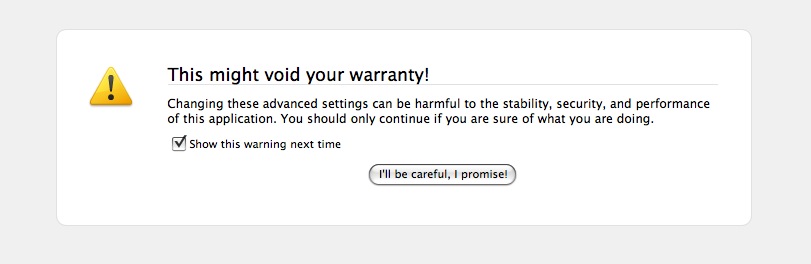
(Ofcourse, there is no warranty to void on your freely downloaded software)

(And let’s hope there are no dragons! Image courtesy of @wandster)
I must admit that I prefer the ‘Dragons’ version (it seems to grab your attention more), but the nature of both messages do make you, as the user, really think about whether you have the skills and knowledge to proceed. A concise explanation about what can happen if you don’t know what you’re doing is also provided in the text below the heading, and the ‘I’ll be careful, I promise!’ button further drives the overall message home (that should you proceed, you’ll be doing something potentially risky).
While the colloquial language might put off some strict usability folks, and the Plain English campaign would most certainly not approve (the headings are not direct, unambiguous, or dare I say boring enough), I think they’re actually quite appropriate for the audience and the situation. If the goal is to make users think twice before messing with the inner workings of the system, then mission accomplished! And these warnings are probably much more effective than a classic, straightforward, boring old warning message – by injecting a little personality into the messages, users are much more likely to read and absorb them, and therefore make an informed decision.
Could these also be simple examples of persuasive design? They kind of represent ‘soft’ constraints – the user is not actually forbidden from proceeding, but the language and tone of voice has deliberately been designed to ensure that users evaluate their level of knowledge and skill before doing so.
What do you think?
Tags: Error messages, Firefox, Persuasive design, Usability, User interface design
Posted in Errors and Error Messages, Usability | Comments (1)
Sebastian Deterding on Persuasive Web Design
July 3rd, 2009
Wow, check out this brilliant presentation by Sebastian Deterding on persuasive design (ie, how we can design to encourage users to adopt specific behaviours of the designer’s or their own intent). This work is absolutely incredible, and has left me inspired and so excited to be involved in design.
In the presentation, Sebastian touches on (among many other cool and interesting things):
- how persuasive design relates to usability, by considering the motivation of a user to do something versus the perceived effort to do it
- conversion rates, or web 1.0 economics, versus more modern and ‘web 2.0’ economic goals
- the multi-disciplinary nature of persuasive design
- persuasive design strategies (including constraints; defaults; visualising and measuring behaviours; using personal, graspable, emotional, and comparable design concepts)
Persuasive Web Design – How to Separate Users from Their Bad Behaviours View more presentations from Sebastian Deterding.
Also, note the section on using defaults (starting around slide 77). Sebastian discusses how people tend to take the path of least resistance and therefore don’t change default values, and he references a study on US driver’s license applications. The study revealed an 80% increase in organ donors after the default value for “Would you like to donate your organs after death?” was changed from “No” to “Yes” – this is related to my earlier post about the importance of setting sensible defaults.
This presentation also reminded me of several of Ferg Bisset’s posts on awareness and motivational design.
Exciting stuff!
Tags: Defaults, Motivation, Persuasive design, Persuasive Web Design, Sepastian Deterding, Usability
Posted in Design | Comments (0)
Usability job titles: What is it you do again?
June 29th, 2009
Russell Wilson recently posted results from a survey of UX/UI professionals, which asked them to rank their preferred job titles. The results showed that ‘User Experience’ was the most preferred prefix, and ‘Designer’ was the most preferred suffix. Russell also pointed out the ambiguity of the term ‘User Experience’, and questioned its longevity as a title term since it is so often misunderstood both within and outside the UX/UI profession.
I think it is interesting to look at what we as professionals think we should be called, but I think it would be even more interesting (and useful) to understand what titles those outside our field expect us to have. Who do they look to contact when they are seeking out our services? What job titles do they search for, and what titles most effectively communicate what we do?
After all, as people who specialize in making sure that products and services are consumable and meet the needs of those who use them, shouldn’t we also make sure that what we ourselves offer is easy to understand and consume? I personally think what we call ourselves is an important part of this, and probably deserves some research in its own right.
Tags: Job titles, Usability, User Experience
Posted in Usability | Comments (0)
Fun with Windows Mobile Error Messages
June 28th, 2009
Just before I started working at my current company, they decided to invest in smart phones for their consultants. A great idea, but unfortunately we all ended up with Windows Mobile devices which have pretty much been a nightmare from day one, and which we now refer to as ‘the brick’. While there are many problems with the phone from a usability and user experience point of view, I thought I’d share one of my favourite examples.
After dialing a number or choosing a contact that you’d like to call, sometimes the call fails for no apparent reason, and this message pops up onto the screen:
“Cannot connect. Ensure that your phone is turned on and correctly configured, and that service is available, before trying again.”

The message is unhelpful for so many reasons, especially the part that states “Ensure that your phone is turned on”. Ahem. If my phone wasn’t on, how would I be reading this message, exactly?
To make matters worse, if you switch to the phone display it shows the text “Phone off” at the top:
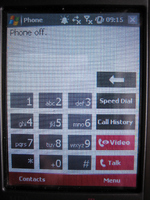
Hm. I’m pretty sure that the phone is on, unless this whole experience is a hallucination.
The first time I had this problem it took me ages to figure out what the messages were trying to tell me, and to figure out how to turn the phone ‘on’ even though as far as I could tell the phone was already on. Apparently the people who designed the UI had a different notion of what constituted the ‘phone’ versus the device itself – the device could be turned on while the phone function was turned off, and hence the ridiculously confusing error message.
This is a great example of how things can go terribly wrong when the designers’ mental models, or ideas about how something works, do not match the user’s. It is also a great example of a significant usability issue that could have (and should have!) been detected well before the device went to market, if sufficient user research and testing had been conducted.
Tags: Error messages, Usability, User interface design
Posted in Errors and Error Messages, Mobile, Usability | Comments (3)
Amazon’s Kindle: A case for accessible design
May 17th, 2009
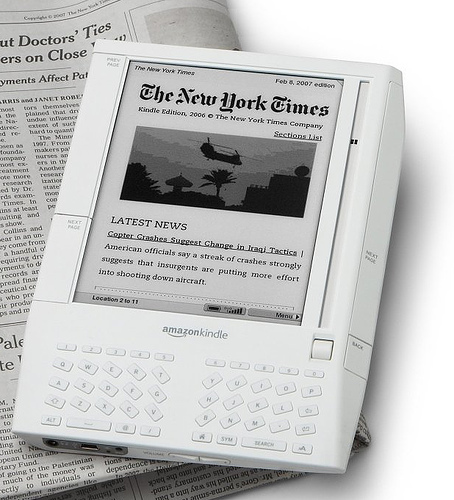
Image of Kindle courtesy of http://usedbooksblog.com/
Accessible design (also known as universal or inclusive design), is all about designing your products and services so they can be accessed and used by as wide an audience as possible, regardless of age, disability, or other limiting factors. It’s not about designing for a specific disability group, rather it is about making sure that mainstream products can still reach the growing number of people without perfect vision, hearing, mobility, or cognition.
Accessible design is more than just a social phenomenon – as the balance of the population continues to tip towards the elderly, it is increasingly being seen as a commercial opportunity. Those at the older end of the population pyramid often do not have the same levels of dexterity or eyesight as their younger counterparts, although they do have considerably more disposable income. Products that are designed to also meet the needs of this rapidly growing user group therefore have the potential to appeal to a considerably larger market.
An interesting yet unexpected example of this came to light recently, when discussions on an Amazon forum led to the revelation that over 50% of Amazon Kindle owners are 50+, and nearly 70% are 40+. So why does the Kindle appeal so much to this older audience? Take a look at this quote from a Publishers Lunch report based on the same forum:
“So many users said they like Kindle because they suffer from some form of arthritis that multiple posters indicate that they do or do not have arthritis as a matter of course. A variety of other impairments, from weakening eyes and carpal-tunnel-like syndromes to more exotic disabilities dominate the purchase rationales of these posters.”
For those with arthritic hands, the form factor of the Kindle makes it easier to hold and easier to page through than heavy hardcovers and flimsy paperbacks. The display also offers several advantages. It uses an electronic ink that is similar to print, so it is crisp and clear. For those with ageing eyes, the text size is also customizable – providing obvious advantages over paper equivalents (this is also an important feature for those with dyslexia). As one legally blind Kindle owner explains, the text-to-speech functionality is also a very important accessibility feature – while the computerized voices are no competition for audio books, they are still progress towards making text more generally available to the visually impaired.
Of course, the Kindle doesn’t have it all figured out (for example, see some additional accessibility requests from Russ Stinehour). But it certainly is a great example of how taking an inclusive approach to the design of a mainstream product can benefit your users and customers in unexpected ways, and how it can also help you to reach a much broader and more lucrative market.
Tags: Accessibility, Accessible design, Inclusive design, Universal design
Posted in Design, Usability | Comments (0)
Axure for wireframes and interactive mockups?
May 9th, 2009
One of the companies I do user-centred design for invited me to join in on an informal demo of Axure this week, a tool for wireframing, building prototypes, and creating design specifications. The person leading the demo had been using a trial version of the software for about a month, and was so excited about it she was trying to convince her company to buy some licenses.
Here’s a screenshot of the tool:
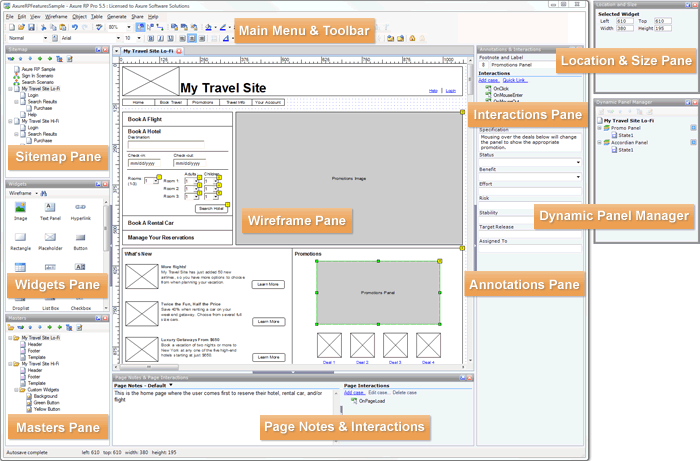
Image from the Axure website
Although I’ve never used Axure myself, I wanted to share a few thoughts I had based on the demo. Currently, I use Microsoft Visio to do most of my wireframing (low-fidelity and medium-fidelity), and when I need to show interaction (eg for user testing, presenting ideas to the project team, or demoing end-to-end scenarios) I’ve been using Microsoft Expressions Web to turn the designs into all-singing, all-dancing prototypes. I’ve been really happy with this process, and have found that the combination of Visio and Expressions has certainly been meeting my needs. But the woman who demoed Axure was so excited (after only a trial!), that I’m somewhat intrigued.
Based on the demo, I gather that some of the strengths of Axure are:
- Useful for quickly communicating and evaluating ideas that are tied to interaction
- Useful for documenting agreed designs, including the behaviour of each control/widget
- Useful for incrementally building up and documenting a design base (especially good for long term, iterative design projects)
- May be quicker (eg than MS Expressions) to create interactive mockups, such as those for user tests and demos?
However, the demo also left me wondering about a few things:
- It was not clear how well Axure serves as a primary design tool (eg in place of Visio), as it was not immediately obvious how well it facilitates ‘design exploration’ – in which case, base initial designs may still have to be roughly defined and agreed in a separate tool (eg Visio) before being moved over to Axure.
- Because of its focus on interactivity, I have some concerns that it may encourage defining detailed interactions too soon in the design process.
I’m considering downloading a trial version to play around with, its just a matter of finding some ‘free’ time. In the meantime, I’m curious if any of you have used Axure? I’d love to hear about your experiences with it, or with other similar tools!
Tags: Design tools, Interaction design, User interface design
Posted in Design | Comments (0)
The importance of setting sensible defaults
May 3rd, 2009
Or, when did ordering tea become so complex?
Have you ever tried to accomplish what you expected to be a straightforward task, but been sidelined because there were too many steps or too many choices to make? This is a common problem in web and software design, but you have probably also come across it in many other day-to-day tasks. For example, this is what happened to me when I tried to order a tea at Starbucks recently:
Me: Hi, can I have a medium tea for take-away?
Starbucks Guy: Ok, one tea. What size would you like?
Me: Medium, please
Starbucks Guy: One medium tea. To drink in, or to take away?
Me: To take away please
Starbucks Guy: Ok
[Starbucks Guy turns around and walks over to the tea bags]
Starbucks Guy [calling over his shoulder]: Would you like one tea bag or two?
Me [yelling back to him over the general coffee shop noise]: One is fine!
Starbucks Guy [still calling over his shoulder]: Is English Breakfast ok?
Me: Yes! English Breakfast!
Starbucks Guy [now standing by the hot water spout]: Would you like room for milk?
Me: Yes, please
Starbucks Guy [now standing back at the counter]: Warm milk, or cold milk?
Me: Cold milk is fine
Starbucks Guy: Ok, cold milk is on the counter next to the napkins
[Starbucks Guy finally hands me my boring old standard cup of tea, so I can go add my boring old regular milk]
In this situation, I asked for a medium tea for take-away, thinking that would be more than enough information for the cashier to prepare my order. I didn’t want anything out of the ordinary, yet he still had to ask me SIX questions before the order was complete; two of the questions repeated information I had already provided, and none involved up-selling.
Now, I understand that one of Starbucks’ defining features is that it allows each customer to personalise their order to fit their unique tastes. But when carrying out common procedres like placing a tea order or installing a new software product, there is likely to be a large portion of the population who want or need basically the same thing, and a smaller portion of the population who want or need something dramatically different. This is why, in user interface design, we try to define sensible ‘default settings’ whenever possible – it makes life easier for the majority of users, and makes processes more efficient.
In the world of software, a default or preset is an initial value that is assigned to a configurable option. Likewise, default options often exist in the physical world; for the configurable option of ‘number of tea bags’, most cafés have a default value of ‘one’. The goal is to identify the values that will meet the needs of most users or customers, so the majority of people don’t have to bother thinking about what the ‘right’ answer is.**
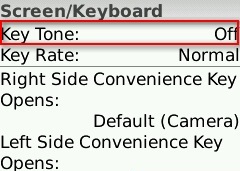
For example, on my Blackberry Pearl, the default setting for the ‘Key Tone’ (the sound that is made when you press a key) is ‘Off’ – most users don’t want to hear a beep every time they press a button on their phone, so they will simply accept this perfectly reasonable default setting. However, for those who need more feedback that a key has been pressed (such as people with vision impairments), they can change the setting to meet their needs:
How can we extend this notion to other real-world processes, like filling a drink order? Simple.
- For each drink type (tea, café latte, cappuccino, etc) collect some data on what people order and what options they choose (size, milk type, topping, etc)
- Identify the most common configurations
- Establish those common configurations as the ‘defaults’
- Allow your customers to indicate any special requests up front, but don’t force them to reiterate the standard options unnecessarily.
Of course, you can’t set default values for everything. For example, you couldn’t set the default drink type to ‘tea’ at Starbucks – there are some choices that customers just have to specify, and defaults are only useful if they are carefully chosen to cover the majority of cases. But whether you’re designing the process behind a web application, a mobile phone, or a face-to-face interaction, think carefully about the defaults so you can optimise the end user experience.
** Note: I am not advocating for designing for the ‘average user’ here. I am suggesting that if you have decided that there is value in making something customisable, you should still make every effort to minimise the need for users to interact with that configuration.
Tags: Efficiency, Optimisation, Process design, Service Design, User interface design
Posted in Usability | Comments (0)
Keeping up, as the world goes mobile
April 26th, 2009
How does your website perform when accessed from a mobile?

Have you ever used your mobile to check the score for the football game you missed, because you were stuck on the train? Or used it to look up the address of that store you were certain was on Oxford Street, but just couldn’t find when you got there? Well, a recent article in The Independent suggests that you’re not alone; twenty five percent of British mobile phone users currently access the web from their mobiles at least once a month, and an estimated 1.2 billion people will regularly use their mobile phones to access the web by 2012.
What does this mean for businesses who currently provide websites and web-based services optimised for desktop browsing rather than mobile users?
Some of the issues
- Your website may provide a poor user experience when accessed by a mobile browser, it or may not work at all. As mobile web use increases, it will be those businesses who offer usable, useful, and satisfying mobile web experiences that will be perceived as innovators and leaders by the web-savvy market.
- You may be missing out on new potential revenue streams. The Independent reported that London has become the core for mobile start-ups, even surpassing Silicon Valley thanks to lower mobile tariffs and an abundance of talented people. The same article notes that major Venture Capitalists value mobile users in their business models at up to six times higher than ‘traditional’ web users.
- You may risk losing customers to competitors who have used their mobile web experience as a differentiator for their services, particularly in highly competitive markets. Personal Banking is an example of an industry where offering best-of-breed mobile services might be a compelling reason for customers to switch.
The way forward
So what can you do now to start building a mobile relationship with your customers, and to make sure you stay ahead of your competitors in the mobile space? Here are a couple of ideas:
First, make sure that your website meets your customers’ real needs when they access it from their mobile phone, and offers a usable, useful, and satisfying experience. You can focus your design and development efforts by:
- researching what users expect from your website when they are mobile
- identifying and documenting the most important tasks for your mobile users
- testing to make sure new designs allow users to perform those tasks
- reviewing your website using different mobile phone browsers to identify high-level issues.
You can also look for innovative ways to engage your customers in this new mobile-oriented world, and stand out from your competitors. In order to stimulate and direct your creativity towards a successful product, consider activities such as:
- conducting creative user research including cultural probes, focus groups, and participatory design techniques to help you understand what is important to your users today, and to help you explore new mobile revenue streams for the future
- making your product development process user centred, to ensure your creative ideas develop into a product which is effective, efficient and satisfying to use.
So, what next?
If you’d like some help improving your mobile presence, feel free to contact me.
Tags: Design, Mobile, Usability, User Experience, User research
Posted in Mobile, Usability | Comments (0)
What makes a great HCI Designer?
April 24th, 2009
(I originally wrote this article for Usability News, after spending a fantastic week enjoying florence for chi2008).
 After spending a week in Florence surrounded by the work of some of the world’s greatest artists and in the company of many of the best and brightest in HCI, it was hard not to start wondering just what it is that sets great HCI designers apart from the rest of the crowd. What qualities do the elite designers at places like Apple, RIM, and Google share, and what do they know that other members of the HCI community could benefit from? Looking back on the CHI proceedings for some insight, here are a few ideas.
One possibility, hinted at in a handful of talks, is that in order for a designer to deeply address the full user experience they have to be able to readily imagine themselves in another’s position, and understand what it feels like to be that person; namely, they have to be able to be empathetic. ‘Knowing the user’ is a central tenet of user centred design, and being able to perceive and feel the emotion of others would certainly provide an edge in doing so. Perhaps then, one quality that great HCI designers possess is the capacity to be especially empathetic.
Another factor separating the good from the great may be related to the selection and application of design tools. Is it possible that the HCI ‘masters’ have a more in-depth knowledge of the available tools, or when and how to use them? Usability evaluations have become the de facto standard for product evaluations at nearly all stages of development, but perhaps being open to employing other methods, especially early on, will more likely lead to getting the right design instead of getting the design right. So perhaps a key to joining the ranks of the world’s brilliant HCI designers is to be well-versed in all of the other non-empirical design methods and, probably more importantly, to be able to choose the right method for the problem at hand.
Related to this is the possibility that today’s great designers are more familiar with the history of product and system designs, and are more willing to leverage this existing design repertoire when faced with new challenges. As Bill Buxton discussed in the closing plenary and also in his BusinessWeek article The Long Nose of Innovation earlier this year, it is critically important to know what has already been done and what is already out there, and not to be afraid to learn from it, build on it, and stretch it. Whether this knowledge is acquired through formal education or simply out of a pure passion for and interest in the field, a depth of understanding about designs past and present and an ability to draw on this in new and creative ways could certainly set some designers apart from others.
Of course, there is always the possibility that great designers are just born that way!
Tags: Design, Designers, HCI, User Experience
Posted in Design | Comments (0)